Oct 9, 2019

Disappointing phone at a lucrative price

HERE'S MY REVIEW OF SAMSUNG GALAXY M30s
I bought this phone during the Amazon Great Indian Festival Sale in Sep/Oct 2019. I had not been purchasing Samsung phones since the past 5-6 years due to their low value-for-money over Chinese companies like Xiaomi, Huawei and Realme, but got interested in this phone after watching tons of positive reviews on YouTube, and considering the price at which Samsung was offering these specs.

However, the phone has turned out to be a major disappointment after using it for 2-3 days. Let's go over various aspects of this device one-by-one.

BATTERY (3/5)
The battery of this device seems to be highly overstated. So much so that my 1-year old Honor phone with 3750mAh battery with an inferior processor and an inferior display gives me a better backup than this phone. I would estimate the actual battery capacity to be closer to 3000mAh than to the stated value of 6000mAh. You can see the battery percentage drop every 2-3 minutes as you use the phone, even with moderate brightness and simple tasks like browsing or reading news.

FINGERPRINT READER (3/5)
The phone comes with a physical fingerprint sensor on the back. Even 3 years ago, these fingerprint sensors used to be extremely fast and accurate. This phone's fingerprint sensor is extremely inaccurate and works only after 2-3 attempts. It's evident that Samsung has cut corners even in the most basic aspects.

DISPLAY (3/5)
Even though Samsung claims the display is a sAMOLED, the viewing angles are pretty bad. If you try to view the phone display from the side, you'll immediately notice significant color distortion. This is most clearly noticeable when the display is showing a white colored background.

STORAGE (3/5)
Even though Samsung claims this phone comes with a fast UFS 2.1 based storage, there's a significant delay saving 48MP pictures. The slow saving speed is closer to what you'd get with an inferior eMMC storage rather than UFS 2.1.

CAMERA QUALITY (3/5)
I took some pictures in broad daylight and found issues with sharpness of the pictures, even when properly focused and camera resolution increased to the maximum allowed 48MP. Even the portrait photos (which Samsung calls Live Focus) are a hit-or-miss. Need to play around with the camera more, but the initial impression is disappointing.

SOFTWARE (3/5)
Samsung's One UI is filled with numerous bugs. At the time of writing this review, it is 9th October already, but Samsung hasn't moved beyond 1 August Android security update. Also, basic things like a convenient shortcut for taking screenshots is missing in One UI. The local search (which Samsung laughably calls Finder) is terribly slow and inaccurate.

OVERALL RATING (3/5)
This phone is a big disappointing. It's sad to see Samsung using fake specifications to lure potential buyers. This strategy may boost Samsung sales for a short time, but will wean away customers from Samsung permanently.

WHERE TO BUY THE PHONE FROM
Even though we wouldn't recommend that you buy this phone, it is available for purchase from Amazon.in: https://amzn.to/35kcd9u

Aug 31, 2014

The Great Xiaomi+Flipkart Scam

Flipkart.com – India’s top e-commerce portal made a history recently by announcing that they’ve managed to sell about 95,000 Xiaomi Mi3 phones through an exclusive deal with the Chinese manufacturer.

As per the deal, only Flipkart.com are allowed to sell the phones in India. Flipkart priced the phone at a super-attractive price of INR 13,999 only.

Flipkart.com and Xiaomi partnered together to create a lot of hype around the phone by claiming that the hardware specs of the phone match those of high end phones sold by other vendors like Sony, Samsung and HTC but priced more than twice of Mi3.

As per the figures shared with media, Flipkart have had 4 or 5 flash sales of the phone through their website. Each sale requires interested buyers to pre-register on Flipkart.com. When the sale starts, only pre-registered buyers get a chance to book a phone by clicking on the “Buy” button.

Typically every stock of phones (between 15,000 to 25,000 pieces) gets sold in a couple of seconds. I managed to buy a phone myself in a flash sale in which 20,000 phones were sold within an unbelievably short time of 2.4 seconds (i.e. 2400 milliseconds). No other product has ever managed to get this kind of traction in India.

However, very soon media started reporting that a significant number of buyers started experiencing all kinds of issues with their phones. The numerous problems that were reported by the media (see references below) include:

  1. Non-functional microphone during voice calls
  2. Defective SIM tray
  3. Defective main camera resulting in faulty pictures
  4. Loose micro-USB port affecting data transfers
  5. Overheating while using the phone
  6. Dysfunctional wall charger
  7. Cracked display
  8. Phone getting stuck in infinite boot loop
  9. Disappearing phone logs and contacts
  10. And potentially more issues

What’s more, as per media reports, affected people kept calling Flipkart support and tried to avail of Flipkart’s 30-day replacement guarantee, but Flipkart kept rejecting replacement requests on one pretext or another (see references below), further frustrating the already unhappy customers even more.

In my case, my phone stopped working after exactly 1 day of use. I experienced a non-functional microphone during voice calls. Which means that I was effectively blocked from using the phone. I did the following:

  1. Logged a replacement request with Flipkart
  2. Waited for 4+ days for Flipkart to verify my request
  3. When Flipkart made no effort to contact me, and took no action on my request,
    1. I made a call to Xiaomi customer support
    2. Tried various steps suggested by Xiaomi support, like
      1. Increased call volume to full, and
      2. Ran the hardware test on the microphone
    3. None of the above steps helped
    4. Xiaomi suggested that I bring my phone to their service center
  4. However, since Flipkart has a 30-day replacement policy, I wrote on Flipkart’s Facebook page requesting them to respond back to me.
  5. They got back to me on the same day and asked me to reset the phone to factory default. Also, they rejected my replacement request.
  6. I did as told by Flipkart, but it did not solve the issue. So I logged a fresh replacement request on Flipkart.com
  7. Again, I waited for 3 days for Flipkart to verify my request. They did nothing. No e-mail (except the auto-generated one), no calls, no confirmation – absolutely nothing.
  8. In-between I chatted with a customer service representative online, but he/she reassured me that I need not worry. Flipkart would solve the issue. I just needed to be patient.
  9. Finally, after 3+ days of waiting my patience gave up. It took about 7 or 8 tweets and a similar number of posts on their Facebook page to wake up Flipkart from their slumber.
  10. Wake up they did, by rejecting my replacement request yet again. Without any explanation. Without any confirmation. Without any action.
  11. Finally, I called up customer support and asked them exactly what was Flipkart up to. Instead of acknowledging the issue and refunding the money to potentially thousands of unhappy customers, they are hiding their face in sand like an ostrich.
  12. After this, I got a call back from Flipkart in which they agreed to replace my phone. I told them that I have absolutely zero confidence in the quality of the phone – since I’ve seen other Mi3 customers in my office face numerous issues with the phone, so I’d prefer a refund instead. However their customer representative told me that they are unwilling to refund the money and the best they can offer me is a replacement.
  13. “But what if the phone malfunctions again?” I asked. “No problem. File a new replacement request” – came their reply. Amazing. Just what a frustrated customer would have loved to hear.

From what I’ve seen at my co-workers who’ve bought the same phone, to the numerous online reports – suggests that what Flipkart+Xiaomi have done in India is nothing short of a big scam. A racket. Nobody knows how many out of the 95,000 phones they’ve sold are defective. In absence of any concrete figures shared by Flipkart+Xiaomi, I am inclined to believe that the number of defective phones could be anywhere between 10%—20% (i.e. approximately 10,000 to 15,000 defective phones).

What should Flipkart/Xiaomi do about this? I expect them to:

  1. Publicly acknowledge the issue. Being honest will help restore customer confidence in their website
  2. Publicly share the actual number of defective phones sold
  3. Immediately issue 100% refund + some compensation to all affected customers
  4. Recall all defective units and don’t resume sales again until the root cause is identified and rectified

Their current stand of refusing to admit the issue and not refunding money to affected customers amounts to nothing short of dishonesty/cheating.

References:

  1. Will defective units, poor service put the brakes on India's Xiaomi Mi 3 excitement?
  2. Xiaomi Mi3 Becomes a Nightmare for Customers, Horrible Flipkart Support, and Product Quality
  3. 1-star and 2-star reviews from certified buyers on Flipkart.com

Customer Complaints:

Nov 18, 2013

Beware of Next Retail (Next.co.in)

Next Retail is a well known and established chain of brick-and-mortar electronics stores in India. It is owned and operated by one of the largest business houses in the Indian subcontinent.

Recently, while looking for the best price for a premium branded hot water geyser, I came across a listing of A.O. Smith HSE-SBS-025 geyser on the online shopping website Next.co.in owned by Next Retail.

The product was listed for INR 9,266 as compared to the MRP of INR 11,800 printed on the product packaging. Sounded too good to be true. But I checked on numerous other websites and the product was being sold in for a price between INR 10,000 to INR 10,800.

Availability

The product was mentioned to be in stock with a promised delivery time of 5 to 7 business days. I booked the product and made advance payment of the entire amount by credit card.

After that, I waited. Every few days, I called their customer care. Asked them for a status. Every time, I faced numerous lies and false assurances. Every time, they told me that they were very sorry that my shipment were delayed, but would get my product “tomorrow”.

After 2 weeks were over, I started asking them for a full refund. They said they will not refund my money. And kept lying about the shipment status. Since they were unwilling to cancel the order, I could not buy the product from elsewhere and kept waiting.

Finally, after umpteen number of calls and after facing numerous lies, I received the product after 19 days of placing the order. Now I am in full mood to sue them for causing me undue harassment and discomfort. Can you help me?

Jul 21, 2013

Online Shopping Scams

Like everybody else, I shop for lot of things on the Internet. Mostly electronics, but I’ve also tried shopping for grocery lately. I recently came across an online shopping scam on the recently launched Amazon.in website by the world’s largest online retailer. Shocking? Then read on.

I recently purchased a mobile phone on the newly launched Amazon.in. Like everybody else, I carefully looked for the rating of the seller on Amazon and chose a seller who had a 5 star rating.

After having received the phone, I left a neutral (3 star) rating for the seller (I was not happy with their quality of service). Soon, I started receiving several unsolicited calls from the seller (LalajiOnline.com) requesting (nee, I should say coaxing) me to withdraw my neutral feedback. I did not comply.

A few days later, I went to Amazon.in to review my feedback and this is what I saw:

ShoppingScam

I discovered that the seller had removed my feedback without any action on my (the customer’s) part. Needless to say that I am shocked beyond words. How can the most reputed online retailer in the world allow a seller to tamper with customer feedback?

Since customer feedback is the only way for people to verify the credibility of a product and a seller, this kind of backdoor behavior by Amazon India makes this website extremely unsafe to shop. You can no longer trust the seller rating on this website.

As you would expect, LalajiOnline.com only leaves 5 star ratings intact and removes everything else. There is no reason to believe that other sellers are not doing the same. So beware of Amazon.in.

May 5, 2013

Broken Android 4.1.2 Jelly Bean Update for Samsung Galaxy S2

On January 31, 2013 Samsung released Android 4.1.2 Jelly Bean update for existing smartphone models including Galaxy S2.
After the upgrade, my phone has become a battery guzzler and overheats like New Delhi does in summers.

I decided to investigate and discovered that maximum overheating (accompanied by battery drain) happens during voice calls. The phone becomes so hot that it becomes impossible to hold next to your ear.
Looks like the idiots at Samsung have mistakenly shipped an application called “Automation Tester” that runs in the same process as the Phone application.

As a result, as soon as you make or receive a call, this test application starts consuming 100% CPU and drains the entire battery within minutes.

Screenshot_2013-05-05-12-48-16
As you can see (above), my phone battery dropped to 82% (from 100%) after just 5-10 minutes of voice calls.

Since I work in the software industry myself, it is hard for me to understand how can any company of global level be so careless that it can ship production software with such degree of carelessness.

If this were my company, I would fire the staff responsible for this extreme stupidity straightaway. Because by the time (and if at all) Samsung comes up with an update for fixing this issue, the phone batteries of millions of people would have been damaged irreversibly due to repeated drain and recharging.
In addition, the phone keeps getting hot throughout the day; the USB mount on Windows OS is broken and there are several other issues like extreme sluggishness and God knows what else.

Shame on Samsung!

Update (7 May 2013): Today Samsung issued a patch for the above issue. I applied the patch and observed that the overheating problem has disappeared. However the Wi-Fi is still broken (i.e. it keeps disconnecting every few seconds).
More Shame on Samsung!
Samsungy

Oct 28, 2012

What one silly software engineer is capable of doing?

You know what one silly software engineer working in an influential software company is capable of doing? Digest this:

  • Millions of laptops waking up unnecessarily from sleep and overheating inside their carry bags
  • Millions of laptop batteries’ life span shortened by 6 months or more
  • Undue energy wastage across the globe
  • Undue global warning across the globe

That’s right. Looks hard to believe? Well, you have to see this for yourself.

For a couple weeks I was struggling with a problem. My Lenovo T420 running Windows 7 Enterprise SP1 (x64) would randomly wake up from sleep while kept in its carry bag. It would do this on its own – without my knowing – and would overheat like crazy till it’s battery ran out.

This started happening only recently. I was not sure what action of mine triggered this behavior. I maintain my laptop software very efficiently and regularly perform the following activities:

  • Updating system BIOS firmware
  • Updating system device drivers
  • Updating installed applications to their latest versions
  • Cleaning up the hard disk using the built-in Disk Cleanup utility and CCleaner (a third-party utility)
  • Defragmenting the hard disk every couple of weeks
  • Installing new software to try out – particularly useful and highly rated system utilities and development tools and frameworks (I am a software development manager by profession)

It was apparent that one of these things had caused a change in my system settings that was causing this weird behavior. But what was it? I wanted to isolate it and revert it so that I could use my laptop when I needed it – and not discover it was at 0% battery charge.

Using the Event Viewer in Windows, this is what I found out:

Event_Viewer

Hmm… Apparently, there is a scheduled task that tries to check whether an update is available for Windows Media Center application. But why did my laptop wake up from sleep, just to check for this update. I opened the Task Scheduler and opened the properties associated with this task:

Task_Scheduler

Sure enough. There it was. Scheduled to check for updates to Windows Media Center daily. And also setup to wake up the laptop from sleep every time it needs to check for update to itself. Horror of horrors.

What kind of idiot programmer would think that the software application that he has worked on, is so bloody important, that it needs to be CHECKED FOR UPDATES DAILY, and also to WAKE UP THE COMPUTER FROM SLEEP TO APPLY THE UPDATE?

What a shame! This one self-absorbed and pompous guy wants to force the latest version of his software down your throat the moment it gets released, even if he has to wake you, your mom, your grandmother, your laptop and your entire goddamned neighborhood from sleep.

If I were Microsoft, I would fix this issue through an auto-update marked with high importance right away, and save millions of units of power across the globe. Not to forget the blessings from millions of customers who find their laptop battery drained out when they need it the most.

Oct 20, 2012

Broken Website and Zero Support on GreenDust.com

While I was looking for a USB wall charger (i.e. travel adapter) a couple of days ago, I discovered an online retail website named GreenDust.com.

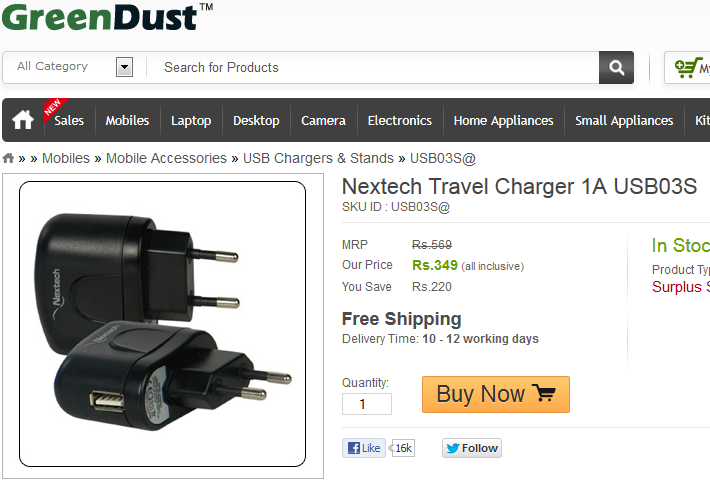
I found a great bargain on this website – a Nextech USB wall-charger (aka travel adapter) for INR 349.

01_Product

I quickly hit the “Buy Now” button, created an account on the website, provided my e-mail ID, billing and shipping details, credit card information and completed the transaction.

I received two e-mails from the website immediately:

  1. Confirmation for registration. This e-mail displayed the e-mail ID and password (in plain text) that I had used for registration.
  2. Confirmation of order. This e-mail displayed the confirmation of placing the order and had an order number assigned to me.

Satisfied with the job done, I logged out. However, my troubles had just begun.

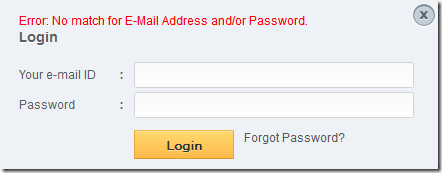
Next day, I navigated to the website to check my order status. I tried logging in with my e-mail ID and password (the same ones that I had used to register and had an e-mail confirmation for).

This is what I saw: Error: No match for E-Mail Address and/or Password.

02_Error

This must be some mistake. Maybe I had mistyped the e-mail ID or the password. I tried again. Same message. And again. Same. And yet again. Same message.

What the shit! I hunted on their website and pulled up their Customer Support e-mail ID. Wrote an e-mail to them with the issue and patiently waited for a response.

Nothing. I did some more experimentation using Charles Web Proxy. Looks like they hire idiots as programmers, because I discovered a 21 second delay in loading some web pages due to a CSS page being referenced on a 192.168.x.x IP address. What sort of foolish programmer could make that mistake?

03_Mistake

I wrote another e-mail to Customer Support explaining the issue. No response. Finally, I called their Customer Support on phone.

A human answered. Good.

Here’s my order number. Can you please check its status?

Yes, we see your order. However, your order cannot be shipped because it contains neither your shipping address, nor your billing address.

But I provided them on the website. Don’t you see these are mandatory fields and your website cannot accept an order without this information.

Sorry sir, let me check it out.

3 minutes on hold.

Sorry sir, looks like there is some problem. Let me enter the details for you.

I repeated the billing address and shipping address on phone.

Oh, one more thing. Can you please check my account? I am unable to login. Let me give you my account details.

Sir, can I put you on hold again?

Another 3 minutes passed.

Sir, sorry for putting you on hold. But you will not be able to login unless we ship your order.

What!!? Are you sure about that?

Positively sure, sir.

I have shopped online from hundreds of websites, but never encountered this issue. Can you please verify if this indeed is the issue and my account isn’t wiped out from your database?

Yes sir. I am confident.

Whatever. But I hope my inability to login on your website won’t impact my order shipment.

No sire. Have a nice day.

Now I am positively sure that some kind of database rollback happened on their side and my account details are wiped out. That explains my inability to login, and my missing shipping and billing address in the order. But they are not going to admit it, will they?

After this experience, 2 more days elapsed. I am still waiting to hear back from their customer support. I tried logging in their website today, but to no avail. The same CSS problem exists. My account is still not recognized. And I am not sure if my order will ever ship.

Weird website, this GreenDust.com. Avoid if possible.

Aug 4, 2012

How Lenovo InstantResume killed my laptop battery

Sometime in the year 2011 Lenovo introduced a (what they tried to project as really clever) feature called InstantResume in their ThinkPad series laptops.

What this clever feature was supposed to do was to keep your network connection alive as you dunk your laptop lid to move from one conference room to another.

InstantResume-Basic

What this feature appears is to claim that even though your laptop will go into sleep mode (when you dunk the lid), somehow Lenovo will still keep your network connection alive.

In reality, what happens is something really dumb: Your laptop does not go into sleep mode at all – rather it keeps running. Moreover, Lenovo refuses to honor the timeout that you specified in the preferences (3 minutes in the screenshot above), so in essence, your laptop continues to run until it runs out of battery charge.

So if you’ve turned on this setting, and then at the end of the day you pack your laptop to head for home, chances are that the laptop stays alive within the bag and overheats, causing irreversible damage to the battery life.

That’s what happened to me. What a shame that I trusted Lenovo engineers to come up with a really innovative and helpful feature!

Mar 12, 2012

An Open Letter to Bharti Airtel

Dear Bharti Airtel,


Once upon a time, you used to be the best Telecom company in India. You had the best quality of service, the lowest downtime, and the lowest response time in addressing customer concerns among your peer companies in the Telecom sector in India.


But your credibility and reputation seem to have taken a huge backseat in the past 1 year. Your profits are shrinking quarter after quarter, you have been heavily penalized by both the Indian and the African governments for indulging in unfair trade practices, your quality of service has gone for a complete toss, and customer satisfaction is the lowest ever.


Looks like you are caught in a vicious circle. The more your profit margins decline, the more you are going to lower your standards, and it will cause still further decline in customer satisfaction levels - which, in turn, will cause your profits to sink lower.


Please come out of this state of constant decline, and become the nice company that you used to be once upon a time. I know this may cause your profits to suffer in the short term, but you may be able to reap some long term benefits this way. Otherwise it's a lose-lose situation - both for you, and for us - your customers.


Yours sincerely,
A customer

Nov 18, 2011

Do you still pay for an anti-virus program?

Technorati Tags: ,,,

If you’re a Windows user and you’re still paying for an anti-virus program, then you need enlightenment. Because Microsoft have made their excellent antivirus program (called Microsoft Security Essentials) free.

SecurityEssentials

It’s fast, light-weight, non-intrusive and effective. It offers the same features as several commercial antivirus programs (like Norton and McAfee) do, including:

  • Real-time protection
  • System scanning
  • System cleaning
  • Rootkit protection
  • and so on…

And if you think that a single antivirus is not good enough, then you can additionally install the excellent Avast Antivirus for home users for free.

AvastAntivirus

Now stop paying for antivirus Smile

Watch that Battery

Some laptops (like the ones manufactured by Lenovo) come with a handy gadget that let’s you monitor the battery level in the Windows taskbar. Others (like the ones manufactured by Dell) do not.

Enter the free tool aptly called BatteryBar:

BatteryBar

BatteryBar does everything that you need from a barebones battery monitor software, like:

  • Showing the battery level
  • Showing whether the battery is charging or discharging
  • Showing the battery wear and tear
  • Showing the approximately battery time remaining

The manufacturers of BatteryBar claim that they are able to accurately predict the battery time remaining because they save historical battery usage data. If you like the product and would like to support the developers, they even offer a paid version with support for fancy themes. Get BatteryBar free from here.

Nov 17, 2011

Why pay CuteFTP when FileZilla is Here

Technorati Tags: ,,,,

Most people need a FTP (File Transfer Protocol) client some time or the other. A lot of Windows users depend on CuteFTP as their FTP client due to the numerous ease-of-use features it provides, such as:

  • An intuitive user interface
  • Ability to queue multiple files for download/upload
  • Ability to download/upload from/to multiple servers simultaneously
  • Automatic file-type detection for switching between text and binary modes
  • Ability to retry failed transfers
  • Ability to set data-transfer speed limits
  • Ability to fallback to passive FTP whenever required (when the server does not support active FTP connections)
  • And so on and so forth

Now, the good news is that you do not need to buy CuteFTP to get all these (and several more) valuable features. Just browse to http://filezilla-project.org/ and download the FileZilla FTP client for free.

FileZillaFTPClient

FileZilla provides all these features and more at no cost. Of course, if you like the product and would like to support the development, feel free to donate via Paypal. Stay happy!

How to Quickly Turn-off Your Screen

With handheld devices getting more powerful every day, the problem we face is that the battery life of these devices keeps decreasing. So if your laptop is running on battery, sometimes you may feel the need to quickly turn off your screen without putting the system into sleep mode. This is where Dekisoft Monitor Off Utility comes handy:

DekisoftMonitorOff

This is a tiny stand-alone utility that does not need to be installed. Just download the EXE from http://www.dekisoft.com/ and set it to start with Windows automatically. The utility runs quietly in the system tray until you press the hotkey (Ctrl+Alt+L by default, but can be re-configured). As soon as you press the key, the utility turns off your screen. The screen can be turned on again simply by moving the mouse cursor, or by pressing any key on the keyboard. Simple, right? Then why not give it a try!

Nov 4, 2010

Another Opera Innovation

The Find in Page feature in Opera seems to work better than other browsers like Internet Explorer, Mozilla Firefox and even Google Chrome.

What happens in Opera when you press Ctrl+F is that Opera dims the entire page, and then highlights the text as you type in a cheerful, bright green color. Pressing F3 and Shift+F3 lets to navigate to the next and previous match, respectively.

Click on this link for a quick demonstration of the same.

Nov 3, 2010

Did you know about Hybrid Sleep?

Perhaps “Sleep” or “Standby” is the one of the most useful computer features invented for home users. Sleep lets you put your laptop / computer into a low power state for some indefinite period of time, and then resume work quickly without the annoying wait involved in booting your computer from scratch.

Sleep

Most laptop users boot their laptops only occasionally; normally we put our laptops to standby every night and resume work quickly in the morning. Sleep keeps all your running programs and even the operating system in the main memory, but shuts down as much of hardware as possible.

In order to keep programs in the main memory, your laptop consumes a small amount of power that drains your battery while it is in standby mode. This power consumption can be anywhere between 1 watt to 3 watts. Moreover, when the operating system (like Windows or Mac OS) detects that your laptop battery has reached a critical limit, it dumps the contents of your entire memory on the hard disk, and puts your machine to hibernate state. This helps preserve the state of your work, and lets the laptop enter the zero power consumption state. However, your laptop takes longer to resume from standby, since the contents of the main memory have to be read from the hard disk, which is much slower than the main memory.

However, did you know that Windows also supports something called Hybrid Sleep in addition to the default Sleep operation. What the Hybrid Sleep operation does is that in addition to putting your laptop in a low power mode, it also dumps the contents of the main memory to the hard disk every time you put your computer to Sleep.

 Hybrid Sleep

Normally, the Hybrid Sleep option is turned off by default, but you can always turn it on in the advanced power settings. This is usually not required, unless your laptop battery is very old and discharges suddenly (without giving Windows enough time to respond to the low battery event). This option will also help you if you have a spare battery and you sometimes swap the batteries while your computer is in standby. In either cases, when you turn the power on, Windows will be able to resume your work and data from the copy of the main memory that resides on the disk.

Neat, isn’t it?

Nov 2, 2010

Amazing Opera 10.63!

I have been a long time user of Google Chrome, but lately I downloaded Opera 10.63 on my Windows desktop and I have been amazed by it’s super-fast speed and ultra-cool looks. Take a look:

Opera

The above picture shows the Speed Dial feature of Opera that opens whenever you start a new tab.

The below screenshot shows the omni-bar feature of Opera (as soon as you start typing something in the address bar):

Opera-2

I am going to try Opera for a few days and see how it stands up to Google Chrome.

Feb 15, 2009

Nightly Tester Tools :: Firefox Add-ons

Being an agile blogger that I am, I found an installed a nifty extension for Windows Live Writer named Blog This today. Blog This extension for Windows Live Writer adds a button to Firefox which starts a new Windows Live Writer blog post pre-populated with content and title from the current web page. That way, one can blog the whole page, or just selected snippets.

Blog This

(Click on the image to view full size)

However, on restarting my browser, I was disappointed to see that the Blog This Extension in Firefox was marked disabled because it was found to be incompatible with Firefox version 3.0.6. Now this can happen sometimes because the developer of the extension did not update the extension after testing it with the latest Firefox update.

Addons

(Click on the image to view full size)

Desperate to make good use of this extension, I found the Nightly Tester Tools extension for Firefox, that lets you enable incompatible extensions (among other things), of course at your own risk.

After installing Nightly Tester Tools I was able to see a new option appear when I right-clicked the disabled add-on that would let me override the compatibility check in Firefox. There was another new button in the add-ons dialog that lets you override this for all Firefox add-ons at once:

Addons

Get the Nightly Tester Tools Firefox Add-on from here.

The difference between IMAP and POP

IMAP and POP are two most common ways to access your web-based e-mail offline, from multiple devices. Most web-based e-mail providers allow you to configure your desktop based e-mail programs such as Mozilla Thunderbird and Microsoft Outlook to read your e-mail. This includes Gmail, Hotmail and even Yahoo! Mail.

So now the question arises that what exactly is the difference between POP and IMAP, and which is better of the two.

What's the difference between IMAP and POP?

Unlike POP, IMAP offers two-way communication between your online e-mail account and your email clients. This means when you log in to online e-mail account using a web browser, actions you perform on e-mail clients and mobile devices (e.g. moving an e-mail message to the 'Friends' folder) will instantly and automatically appear in your online e-mail account (i.e. it will already have a 'Friends' folder on the next time you sign in).

IMAP also provides a better method to access your mail from multiple devices. If you check your email at work, on your mobile phone, and again at home, IMAP ensures that new mail is accessible from any device at any given time.

Finally, IMAP offers a more stable experience overall. Whereas POP is prone to losing messages or downloading the same messages multiple times, IMAP avoids this through two-way syncing capabilities between your mail clients and your web e-mail account.

POP versus IMAP

(Click the image for a full size version)

If you're trying to decide between using POP and using IMAP, go with IMAP as your first choice. Note that since POP is a simpler protocol to implement, you are more likely to find support for POP than for IMAP.

Feb 11, 2009

Cloudo Web Desktop

What's a web desktop? Put simply, a web desktop is a desktop environment hosted on a remote server that you can access through your web-browser over an Internet connection.

To quote Wikipedia:

A web desktop or webtop is a desktop environment embedded in a web browser or similar client application. A webtop integrates web applications, web services, client-server applications, application servers, and applications on the local client into a desktop environment using the desktop metaphor. Web desktops provide an environment similar to that of Windows, Mac, or a graphical user interface on Unix and Linux systems. It is a virtual desktop running in a web browser. In a webtop the applications, data, files, configuration, settings, and access privileges reside remotely over the network. Much of the computing takes place remotely. The browser is primarily used for display and input purposes.

I recently did a comparison of some free to use Web Desktops available on the Internet, and came to rank Cloudo Web Desktop at the top. My ranking can be summarized as:

  1. Cloudo
  2. G.ho.st
  3. Psych Desktop

The ranking is purely based on how closely the desktop resembles the "real thing" and how polished it feels to look at and to use.

I recommend that you try all three and choose your personal favorite. I was most impressed by Cloudo and couldn't stop raving about how beautiful it looked with different skins:

Cloudo Web Desktop

(Click on the screenshot to view full size)

It was very easy and intuitive to switch the look and feel to resemble Windows XP, Windows Vista, Mac OS X, Ubuntu or even Windows 3.1 (if you were around when it existed). You won't believe what you'll see in your browser. Click here to try it out straightaway.

Jan 18, 2009

Bug in Windows Vista Search

I am an avid fan of Windows Vista - someone who goes out of my way to convince my friends and family that Windows Vista ain't as bad as it is made out to be by the media. 4 out of 5 laptops at my home are running Windows Vista (the fifth laptop and my desktop run Windows XP).

Therefore it really hurts me whenever I discover a glaring bug in Vista that out to have been caught by the Windows Quality Engineering team long back. Today I discovered one such bug that has significantly dented my perception of Vista and has caused me tremendous pain.

It all started when I decided to do something about a major annoyance that I had been facing with the Windows Search on my primary office laptop. Despite adding some of my custom folders to the Indexing Options, files from these folders would never show up in my search results. So I decided to tweak my search preferences (i.e. Indexing Options) and see if I could fix this longstanding problem of mine.

I started by typing "Indexing" in the snazzy Vista Start menu, and smiled on seeing Windows Search bring up what I wanted right on top:

Start Menu

I clicked on "Indexing Options", leading to the list of my indexed locations, and clicked on "Advanced":

Indexing Options

This brought up another dialog (the one that I was really looking for):

Advanced Options

The first thing that I tried doing with this dialog was to click the "Restore Defaults" button, hoping to start on a fresh slate. However, doing so brought up this horrendous looking dialog warning me that all hell would break lose if I proceeded with my actions:

Restore Default Settings

Now one thing that I always wish I had more of in this life is time. Not wanting to spend hours waiting for Windows to re-index everything on my disk, including zillions of files and e-mails, I hurriedly clicked "Cancel", and went back to what I was doing -- replying to my 6000+ unread e-mails in Outlook.

After working for 10 minutes and noticing that my laptop's hard disk was spinning endlessly, I noticed something that shook me completely. Despite clicking "Cancel" on the previous dialog (where Windows warned me that by going ahead, my entire index would be re-built from scratch), my index was still being re-built from scratch. Duh!

It has been three hours and I am still waiting for the index to be re-built. Every time I search for any e-mail in Outlook, this is what I get:

Microsoft Outlook

This index re-building has completely blocked me from doing my office work effectively -- which is mostly done on Microsoft Outlook -- as I wait endlessly for Windows to re-index everything that I had saved on this laptop in the past six months.

As I type this blog, I am thinking of the careless developer and the equally callous test engineer at Microsoft Redmond, whose joint oversight causes such loss of reputation to great companies like Microsoft.

I hope they fix this in Windows 7.